7 Signs Your Business May Be Overpaying for Credit Card Processing
Most owners never notice their fees creeping up. Here are seven things on your statement, and in your contract, that are worth a second look.

Nobody opens a business because they love reading merchant statements. You signed up with a processor at some point, the card machine worked, and you moved on to the hundred other things that needed you that week.
That is normal. It is also how a lot of owners end up paying more than they need to. Processing costs rarely jump all at once. They drift. A new fee here, a small rate change there, a notice buried in a statement insert you never saw.
None of the signs below proves you are overpaying. Each one is simply a reason to look closer. If two or three of them sound familiar, it is probably worth an hour of your time.
1. You don't know your effective rate
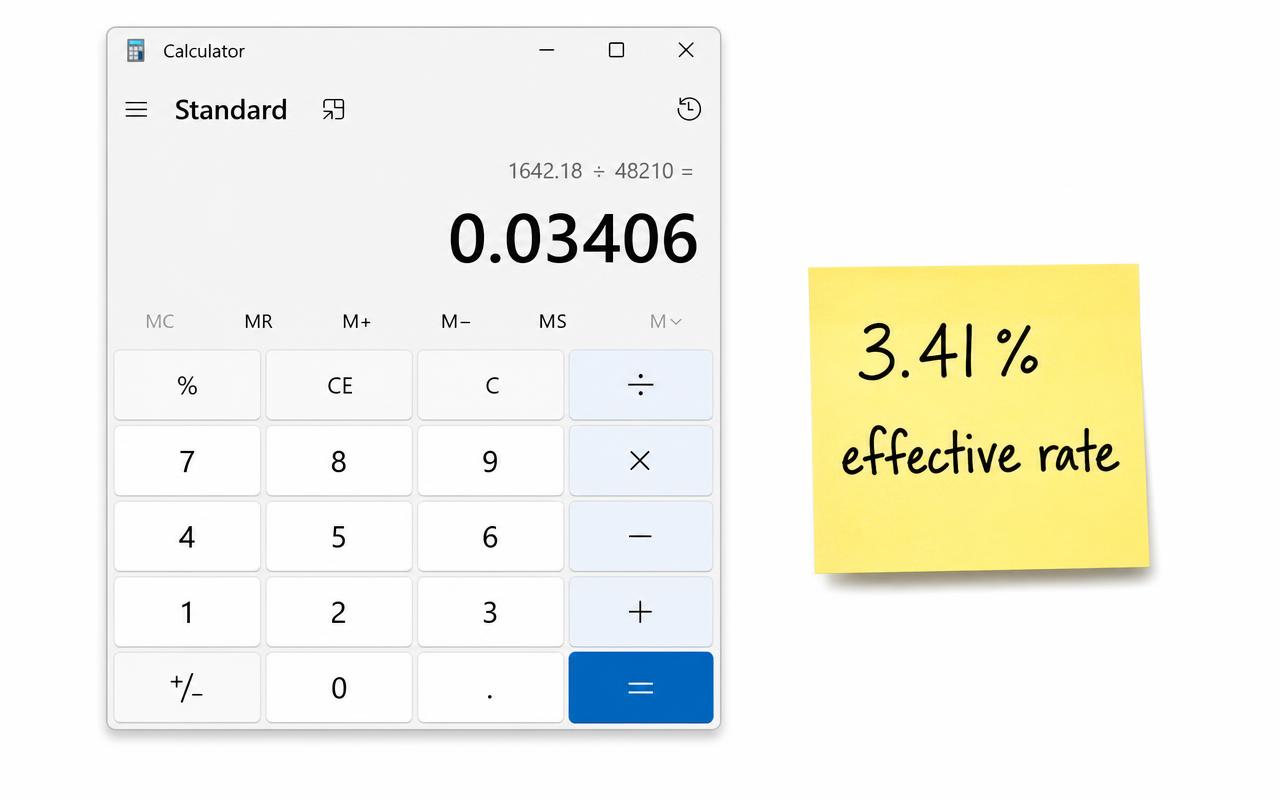
Your effective rate is the one number that tells you what processing really costs you. You get it by dividing your total fees for the month by your total card sales. If you paid $1,200 in fees on $40,000 in sales, your effective rate is 3%.
Most owners know the rate they were quoted. Far fewer know their effective rate, and the two are often different. If you have never done this math, start there. We walk through it step by step in How to Calculate Your True Credit Card Processing Rate, or you can plug your numbers into the free calculator.
2. Your fees went up but your sales didn't
Pull two statements from about a year apart, for months with similar sales. Compare the total fees. If you are paying noticeably more on the same volume, something changed.
Sometimes the reason is fair. The card networks adjust their own rates, and those costs get passed along. But sometimes the increase comes from the processor's side, in the part of the bill they control. You won't know which one it is until you look.
3. Your statement has fees you can't explain
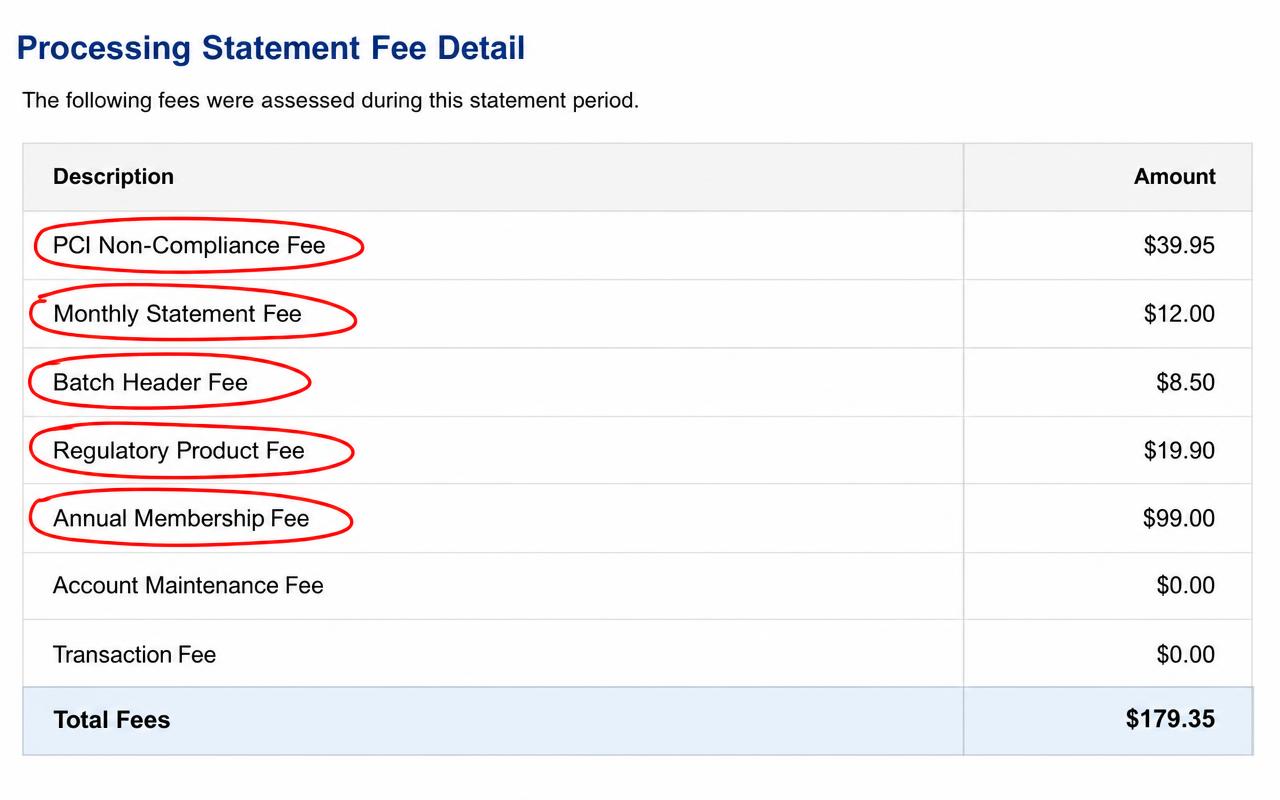
Statements are full of short, vague labels. Things like "service fee," "regulatory fee," "account fee," or a three-letter code with a dollar amount next to it.
Some of these are normal costs of accepting cards. Others are charges the processor added and could remove. If you can't tell what a line means, that alone is a sign. A good processor should be able to explain every fee on your bill in one sentence.
4. You're paying a PCI non-compliance fee
PCI DSS is the payment card industry's security standard. Your processor or acquiring bank can tell you how to validate compliance for your setup. That may involve a self-assessment questionnaire, scans, or other requirements. Some processors charge a non-compliance fee when required validation is missing.
Ask what requirement is outstanding, how to complete it, and when the fee will stop after your status is accepted. Paying the fee does not make your business compliant, and completing a questionnaire alone may not satisfy every requirement.
5. You're still leasing your card terminal
Equipment leases are one of the more expensive surprises in this business. Some leases run for several years, can't be canceled, and add up to far more than the machine would cost to buy outright.
Check your statement or your bank account for a separate equipment charge. Then look up what a similar terminal costs to buy today. The gap can be eye-opening.
6. Your pricing plan is "tiered" and you don't know which tier you're in
With tiered pricing, each sale gets sorted into a bucket, usually called qualified, mid-qualified, or non-qualified. The quoted rate usually applies only to the cheapest bucket. Rewards cards, keyed-in cards, and online sales often land in the more expensive ones.
Tiered pricing isn't automatically bad. The problem is that it makes your real cost hard to see. If most of your sales are landing in the higher tiers, your quoted rate tells you very little. You can read more in Why Your Quoted Processing Rate Isn't Always What You Actually Pay.
7. You haven't looked in over a year
This is the most common sign of all. Contracts renew automatically. Promotional rates expire. Fees get added with a notice printed on page three of a statement.
None of that requires anyone to do anything wrong. It just requires nobody to be watching. A once-a-year check is usually enough to catch it. Here is a simple routine for reviewing your costs.
One sign on its own doesn't mean much. Three or more is a good reason to sit down with last month's statement, or have someone sit down with it for you.
What to do next
First, separate a pricing increase from a business change
A higher effective rate isn't automatically a worse deal. A slow month spreads the same fixed fees over fewer sales. More online payments or a different card mix can also change costs. Compare months with similar volume, average tickets, and payment methods before blaming a rate increase.
| What changed? | What to check next |
|---|---|
| Sales fell, but flat fees stayed the same | Compare recurring fees in dollars, not just the effective rate. |
| More customers paid online | Separate online and in-person volume and ask about their pricing. |
| Similar sales, new monthly charge | Request the fee's purpose, contract basis, and effective date. |
| One unusually expensive month | Look for annual fees, disputes, or one-time charges. |
Turn a small fee into an annual number
Illustrative example: a recurring fee
Start with the easy part. Grab your most recent statement and find two numbers: total card sales and total fees. Divide fees by sales. Now you know your effective rate.
Then go line by line through the fees. Circle anything you can't explain. Call your processor and ask about each one. Write down what they say.
If that sounds like more than you have time for, that is exactly what our free audit is for. We go through the statement with you and show you what you're paying. You decide what, if anything, to do about it.
Further reading
For payment-security basics, see the the PCI Security Standards Council's Guide to Safe Payments. Your acquiring bank or processor can confirm which validation requirements apply to your business.